JoSAA seat allotment result आने के बाद बहुत से students और parents सिर्फ यह देखते हैं कि कौन सा college और branch मिला है।
लेकिन counselling में असली काम allotment result के बाद शुरू होता है।
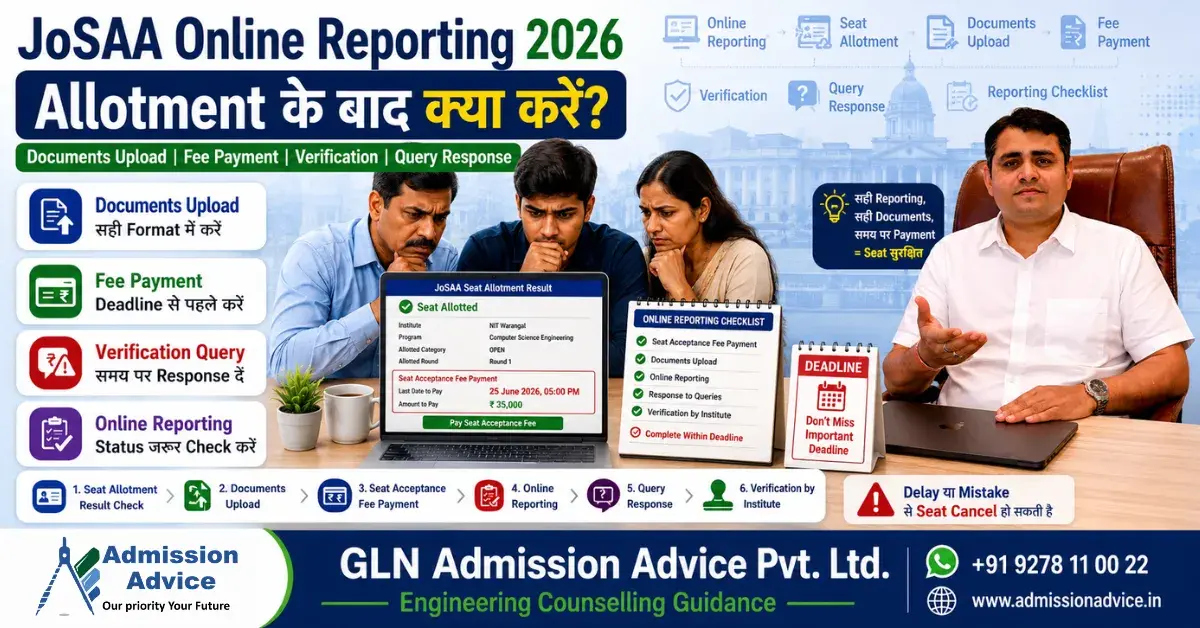
Seat allotment दिखना final admission नहीं है। Candidate को allotted seat retain करने के लिए Seat Acceptance Fee pay करनी होती है, required documents upload करने होते हैं, online reporting complete करनी होती है, verification status check करना होता है और अगर reporting officer कोई query raise करे तो deadline के अंदर reply देना होता है।
सीधी बात समझिए:
💬 Blog counselling पर सीधे guidance चाहिए?
हमारे expert Rajesh Mishra जी से WhatsApp पर पूछें — free initial guidance
JoSAA में seat allotment एक opportunity है।
Online reporting उस opportunity को सुरक्षित रखने की process है।
अगर candidate fee payment, document upload या query response में गलती करता है, तो अच्छी rank और अच्छा allotment होने के बाद भी seat risk में आ सकती है।
इस blog में JoSAA Online Reporting 2026 को simple Hindi + basic English में step-by-step समझाया गया है, ताकि allotment के बाद student और parent दोनों सही action ले सकें।
Important Note: Online reporting steps, deadlines, document requirements, fee rules और query response timelines official JoSAA 2026 Business Rules, Schedule और candidate portal instructions के अनुसार final होंगे। Final action लेने से पहले official JoSAA portal जरूर verify करें।
JoSAA Online Reporting 2026 क्या है?
JoSAA Online Reporting वह process है जिसमें seat allotment के बाद candidate अपनी allotted seat को accept करता है, Seat Acceptance Fee pay करता है, documents upload करता है और online verification complete करवाता है।
यह पूरी process virtual reporting centres के through online होती है।
Online reporting में verifying authority candidate के uploaded documents के आधार पर important details verify कर सकती है, जैसे:
- Date of Birth
- Category
- PwD status
- KM status, अगर applicable हो
- Class 12 passing status
- Eligibility-related details
- Uploaded certificates and claims
Online reporting complete होने के बाद candidate आगे के JoSAA rounds या final admission process में official rules के अनुसार continue करता है।
Seat Allotment के बाद Candidate को क्या-क्या करना है?
JoSAA seat allotment result देखने के बाद candidate को सिर्फ result screenshot लेकर relax नहीं होना है।
उसे immediately action checklist follow करनी चाहिए।
Allotment के बाद Quick Action Checklist
| Step | Candidate Action |
| Step 1 | JoSAA portal पर seat allotment result check करें |
| Step 2 | Provisional seat allotment letter download करें, अगर available हो |
| Step 3 | Seat Acceptance Fee, SAF amount और deadline check करें |
| Step 4 | SAF payment successful करें |
| Step 5 | Payment receipt और transaction proof save करें |
| Step 6 | Required documents upload करें |
| Step 7 | Freeze, Float या Slide willingness submit करें, जहां applicable हो |
| Step 8 | Online reporting status check करें |
| Step 9 | Query आए तो deadline में reply करें |
| Step 10 | Verification complete status confirm करें |
| Step 11 | Next round, withdrawal, PAF या CSAB planning समझें, जहां applicable हो |
Step 1: Seat Allotment Result Check करें
Candidate को JoSAA portal पर login करके seat allotment result check करना चाहिए।
Result में allotted institute, branch, category, quota और seat type जैसी details हो सकती हैं।
क्या Check करें?
- Allotted institute सही है या नहीं
- Branch / academic programme कौन सा है
- Seat category क्या है
- Home State / Other State quota applicable है या नहीं
- Round number कौन सा है
- Reporting deadline क्या है
- Fee payment deadline क्या है
- Candidate को first-time allotment है या upgraded allotment
Common Mistake
Students सिर्फ college name देखकर खुश या परेशान हो जाते हैं, लेकिन reporting deadline और fee payment instructions check नहीं करते। यह सबसे बड़ी गलती है।
Step 2: Seat Acceptance Fee Payment करें
JoSAA Online Reporting में Seat Acceptance Fee payment बहुत critical step है।
Candidate को SAF उसी round में pay करनी होती है जिसमें उसे पहली बार seat allot होती है।
JoSAA 2026 SAF Amount
| Candidate Category Tag | Seat Acceptance Fee |
| SC, ST, GEN-PwD, GEN-EWS-PwD, OBC-NCL-PwD, SC-PwD, ST-PwD | ₹15,000 |
| All other candidates | ₹30,000 |
SAF में ₹5,000 JoSAA processing charge शामिल है। ₹5,000 deduct करके बाकी amount institute admission fee में adjust किया जाएगा।
SAF Payment क्यों जरूरी है?
Seat Acceptance Fee pay नहीं करना allotted seat को reject करने के बराबर माना जा सकता है। ऐसी स्थिति में candidate आगे के JoSAA rounds में participate नहीं कर पाएगा।
Payment के बाद क्या Save करें?
- Payment receipt
- Transaction ID
- Bank debit proof
- Portal payment success screenshot
- Acknowledgement, अगर available हो
Important: Bank से amount cut होना enough नहीं है। JoSAA portal पर payment successful status दिखना जरूरी है।
Step 3: Documents Upload करें
Seat Acceptance Fee payment के बाद candidate को required documents upload करने होते हैं।
Official JoSAA reporting guidance के अनुसार registered candidates, documents upload और SAF payment के बाद online document verification virtual reporting centres द्वारा किया जाता है।
Common Documents List
Candidate profile के अनुसार ये documents required हो सकते हैं:
| Document | Purpose |
| Class 10 certificate | Date of birth / identity verification |
| Class 12 marksheet | Passing status और eligibility |
| JEE Main details | NIT, IIIT, IIEST, GFTI admission route |
| JEE Advanced details | IIT admission route |
| Category certificate | SC/ST/OBC-NCL claim |
| OBC-NCL certificate | OBC-NCL reservation claim |
| EWS certificate | GEN-EWS claim |
| PwD certificate | PwD status verification |
| State of eligibility proof | NIT Home State / Other State context |
| Medical certificate | Official format, if required |
| Undertakings/forms | As per JoSAA instructions |
Final document list candidate profile और official JoSAA instructions पर depend करेगी।
Step 4: Documents Upload करते समय क्या ध्यान रखें?
Documents upload में छोटी गलती भी query create कर सकती है।
Technical Checklist
- File clear और readable हो
- Full page visible हो
- Seal और signature कटे हुए न हों
- Certificate number visible हो
- Issue date visible हो
- Candidate name clear हो
- DOB clear हो
- PDF/JPG format portal instructions के अनुसार हो
- File size allowed limit में हो
- Multiple pages सही order में merge हों
- Upload के बाद preview check करें
Document-Specific Warnings
Class 10 Certificate
Class 10 certificate में name और date of birth clearly match होने चाहिए।
Class 12 Marksheet
Class 12 marksheet में passing status, marks, board और candidate name clear होने चाहिए। 75% marks rule या top 20 percentile case में यह document बहुत important है।
OBC-NCL Certificate
OBC-NCL certificate correct format, valid issue date, Non-Creamy Layer mention और competent authority से होना चाहिए।
EWS Certificate
EWS certificate income certificate से अलग हो सकता है। Correct EWS format, financial year और authority जरूर check करें।
PwD Certificate
PwD certificate competent authority से issued होना चाहिए। PwD candidates को official physical verification instructions भी check करनी चाहिए, जहां applicable हो।
Medical Certificate
Medical certificate official JoSAA format में होना चाहिए। Random doctor note upload करना risky हो सकता है। JoSAA certificate format page पर relevant certificate formats available रहते हैं।
Step 5: Freeze, Float या Slide Willingness Submit करें
Seat allotment के बाद candidate को willingness option submit करना होता है, जहां applicable हो।
Quick Meaning
| Option | Meaning |
| Freeze | Current seat से satisfied, आगे upgrade नहीं चाहिए |
| Float | Current seat retain रखते हुए higher preferences में upgrade चाहिए |
| Slide | Same institute में higher branch चाहिए |
Important Warning
Freeze, Float और Slide को बिना समझे select न करें।
Wrong option future upgrade chance या seat planning को affect कर सकता है। Candidate को अपनी original choice order, current allotted seat और higher preferences carefully review करनी चाहिए।
Online Verification में क्या होता है?
Online verification में reporting centre candidate के uploaded documents verify करता है।
Official JoSAA reporting guidance के अनुसार verification के दौरान DOB, Category, PwD, KM और passing status जैसे parameters verify/update किए जा सकते हैं।
Verification के Possible Outcomes
| Verification Status | Meaning |
| Verified / Accepted | Documents सही पाए गए |
| Query Raised | किसी document/detail पर clarification चाहिए |
| Deficiency / Correction Needed | Corrected document required हो सकता है |
| Rejected / Cancel Risk | Serious eligibility/document issue हो सकता है, subject to rules |
Candidate को portal status regularly check करना चाहिए।
Verification Query क्या होती है?
Verification query तब आती है जब reporting officer को किसी document या detail में doubt होता है।
Query का मतलब हमेशा rejection नहीं होता। लेकिन query ignore करना serious mistake है।
Query किन Reasons से आ सकती है?
- Name mismatch
- Date of birth mismatch
- Class 12 marksheet issue
- Passing status unclear
- OBC-NCL certificate invalid/old/wrong format
- EWS certificate wrong format
- PwD certificate issue
- Category certificate unreadable
- Medical certificate incomplete
- State of eligibility confusion
- Document blurred है
- Seal/signature missing है
- Certificate number visible नहीं है
- 75% / top 20 percentile eligibility doubt
Query का Reply कैसे दें?
Query आने पर candidate को calm लेकिन fast action लेना चाहिए।
Query Response Step-by-Step
| Step | Action |
| Step 1 | JoSAA portal login करें |
| Step 2 | Query reason carefully पढ़ें |
| Step 3 | कौन सा document correction चाहिए, identify करें |
| Step 4 | Correct document official format में ready करें |
| Step 5 | Clear scan/PDF upload करें |
| Step 6 | Short clarification लिखें, अगर portal allow करता है |
| Step 7 | Deadline से पहले submit करें |
| Step 8 | Submit के बाद status check करें |
| Step 9 | Query resolved हुई या नहीं, monitor करें |
Query Response में क्या न करें?
- Guess करके wrong document upload न करें
- Blurred photo upload न करें
- Deadline का wait न करें
- सिर्फ email/SMS पर depend न करें
- Cyber cafe वाले के भरोसे portal status न छोड़ें
- Query पढ़े बिना document replace न करें
- Duplicate wrong certificate upload न करें
Query Response Deadline Miss करने का Risk
Query response deadline miss करना JoSAA online reporting में बहुत serious issue है।
अगर candidate query का reply समय पर नहीं देता, तो:
- Online verification incomplete रह सकती है
- Seat confirmation risk में आ सकता है
- Allotted seat cancel हो सकती है, subject to official rules
- Candidate आगे के rounds में प्रभावित हो सकता है
- Refund/deduction rules applicable हो सकते हैं
Practical Advice
Allotment के बाद candidate को JoSAA portal दिन में कम से कम 2 बार check करना चाहिए:
- Morning
- Evening
Email और SMS useful हैं, लेकिन final source candidate login ही है।
Deadline Miss करने का Overall Risk
JoSAA Online Reporting में deadlines strict होती हैं।
Candidate अगर fee payment, document upload या query response deadline miss करता है, तो problem हो सकती है।
Deadline Miss होने पर Possible Risk
| Missed Action | Possible Risk |
| SAF payment miss | Seat rejection/cancellation risk |
| Documents upload miss | Verification incomplete |
| Query response miss | Seat confirmation risk |
| Willingness option miss | Upgrade/seat planning impact |
| Withdrawal window miss | Refund/exit planning affected |
| PAF miss, NIT+ candidate | Seat forfeiture and CSAB vacancy risk |
Reporting के बाद Next Round में क्या होगा?
Online reporting complete होने के बाद candidate आगे के round में अपने willingness option और official rules के अनुसार move करता है।
अगर Candidate ने Freeze किया है
Candidate current allotted seat से satisfied है और आगे upgrade नहीं चाहता। Further round upgrade generally नहीं होगा।
अगर Candidate ने Float किया है
Candidate current seat retain करता है और higher preference choices में upgrade के लिए consider हो सकता है।
अगर Candidate ने Slide किया है
Candidate same institute में higher preference branch के लिए consider हो सकता है।
अगर Seat Upgrade होती है
अगर candidate की seat अगले round में upgrade होती है, तो previous allotted seat automatically replaced हो सकती है, subject to official rules। Candidate को new allotment details और reporting instructions check करनी होंगी।
अगर Seat Same रहती है
Candidate current seat retain करता है। उसे portal status और further instructions check करते रहना चाहिए।
अगर Query Pending है
Query pending होने पर candidate को next round से पहले या official deadline के अंदर response देना जरूरी है। Pending verification को हल्के में न लें।
NIT+ Candidates के लिए Round 5 के बाद क्या ध्यान रखें?
NIT+ System candidates के लिए JoSAA Round 5 के बाद Partial Admission Fee, PAF, important हो सकता है।
JoSAA 2026 PAF Amount
| Candidate Category Tag | PAF Amount |
| SC, ST, GEN-PwD, GEN-EWS-PwD, OBC-NCL-PwD, SC-PwD, ST-PwD | ₹20,000 |
| All other candidates | ₹45,000 |
PAF institute admission fee में adjust होता है, लेकिन paid होने के बाद refundable नहीं है।
PAF Miss करने का Risk
अगर NIT+ candidate PAF pay नहीं करता, तो provisionally allotted seat forfeited हो सकती है और वह seat CSAB Special Rounds के लिए available हो सकती है। ऐसे case में SAF refund ₹7,000 withdrawal processing charge deduction के बाद हो सकता है।
Practical Examples
Example 1: Seat मिली लेकिन SAF Payment Miss
Student को Round 1 में NIT seat मिली। Family ने सोचा पहले documents देखेंगे, payment बाद में करेंगे। Deadline निकल गई।
Risk: Seat rejection/cancellation risk.
Correct Action: Allotment के तुरंत बाद SAF deadline check करें और payment successful status confirm करें।
Example 2: Fee Payment Done लेकिन Documents Upload Pending
Candidate ने SAF pay कर दी लेकिन documents upload नहीं किए।
Risk: Online verification complete नहीं होगा।
Correct Action: SAF payment के बाद तुरंत documents upload करें और preview check करें।
Example 3: OBC-NCL Query आई
Candidate ने old OBC-NCL certificate upload किया। Reporting officer ने query raise की।
Correct Action: Query reason पढ़ें, valid OBC-NCL certificate official format में upload करें और deadline से पहले response दें।
Example 4: Query Reply किया लेकिन Status Check नहीं किया
Student ने document upload कर दिया, लेकिन status check नहीं किया। Query unresolved रही।
Correct Action: Response submit करने के बाद verification status monitor करें।
Example 5: Float रखा और Next Round में Upgrade हुआ
Candidate को Round 1 में NIT Mechanical मिला, उसने Float रखा। Round 2 में higher preference NIT Electrical मिली।
Action: New allotment details check करें, reporting instructions follow करें और portal status verify करें।
JoSAA Online Reporting Common Mistakes
Mistake 1: Allotment Result को Final Admission समझना
Seat allotment result final admission नहीं है। Reporting complete करनी होती है।
Mistake 2: SAF Payment Late करना
SAF payment miss होने पर seat risk हो सकती है।
Mistake 3: Payment Status Check नहीं करना
Bank debit को payment success मान लेना गलत है।
Mistake 4: Blurred Documents Upload करना
Unreadable document query या rejection risk create कर सकता है।
Mistake 5: Query Response Ignore करना
Query response miss करना dangerous है।
Mistake 6: Wrong Certificate Format
OBC-NCL, EWS, PwD और Medical certificate official format में होने चाहिए।
Mistake 7: Freeze, Float, Slide बिना समझे Select करना
Wrong willingness future rounds की planning affect कर सकती है।
Mistake 8: Portal Daily Check नहीं करना
Email/SMS delay हो सकता है। Candidate login final source है।
Mistake 9: PAF को Ignore करना
NIT+ candidates को Round 5 के बाद PAF planning करनी होती है।
Mistake 10: Parents को Process से दूर रखना
Parents को fee, documents और deadlines की जानकारी होनी चाहिए।
Parent-Student Online Reporting Checklist
Student Checklist
- Seat allotment result check किया
- SAF amount और deadline note की
- SAF payment successful status देखा
- Receipt save की
- Documents upload किए
- Willingness option selected
- Query status check किया
- Next round option समझा
- PAF/CSAB planning समझी, अगर applicable हो
Parent Checklist
- Payment balance ready है
- OTP mobile available है
- Documents folder ready है
- Category/EWS/OBC/PwD certificate checked है
- Class 12 marks eligibility clear है
- Portal login details safe हैं
- Query response deadline monitored है
- Future fee/PAF budget planned है
Expert Advice: Online Reporting को Formality मत समझिए
मेरी practical counselling advice साफ है:
JoSAA Online Reporting को “बस documents upload” वाली formality मत समझिए।
यह seat confirmation और eligibility verification का critical stage है।
Allotment के बाद candidate को ये पांच काम तुरंत करने चाहिए:
- SAF payment successful करना
- Documents upload करना
- Freeze, Float या Slide समझकर submit करना
- Verification status check करना
- Query आए तो deadline में response देना
Rank और choice filling के बाद भी अगर reporting में गलती हुई, तो पूरा outcome प्रभावित हो सकता है।
JoSAA Online Reporting 2026 seat allotment के बाद सबसे important practical stage है।
Allotment result देखने के बाद candidate को तुरंत SAF payment, documents upload, online verification, query response और willingness option पर action लेना होता है।
Fee payment के बाद भी process complete नहीं होता। Documents upload करने के बाद भी process complete नहीं होता। Verification status और query response equally important हैं।
Final advice साफ है:
JoSAA में seat allotment मिलने के बाद हर दिन candidate login check करें।
Payment successful status, document verification status और query response deadline miss न करें।
Wrong reporting handling से अच्छी rank और अच्छा allotment भी risk में आ सकता है।
अगर JoSAA allotment के बाद online reporting, documents upload, SAF payment, query response, Freeze-Float-Slide, PAF या CSAB planning को लेकर confusion है, तो profile-based counselling guidance लें।
GLN Admission Advice Pvt. Ltd.
Engineering Counselling Guidance के लिए WhatsApp करें:
- Message: JoSAA Reporting
- WhatsApp: +91 9278 11 00 22
- Website: www.admissionadvice.in
Note: Guidance candidate की allotted seat, rank, category, document status, payment status, willingness option और official JoSAA rules पर depend करती है। कोई admission guarantee नहीं दी जाती।
Read Also:
- JoSAA Counselling 2026 Complete Guide: Registration, Choice Filling, Seat Allotment और Reporting Process
- JoSAA Counselling 2026 Schedule: Registration, Choice Filling, Seat Allotment और Important Dates
- JoSAA Mock Allotment 2026: Meaning, Importance और Choice Filling Strategy
- JoSAA Freeze Float Slide 2026: Seat Allotment के बाद कौन सा Option Choose करें?
- JoSAA 2026 में 75% Marks Rule: JEE Main Rank के बाद भी Admission क्यों रुक सकता है?
- JoSAA Counselling 2026 Documents List: Online Reporting और Verification के लिए Complete Checklist
- JoSAA Choice Filling 2026: IIT, NIT, IIIT और GFTI Admission के लिए Best Strategy
- JoSAA Seat Acceptance Fee 2026: Payment Process, Amount, Deadline और Seat Cancel Risk
- JoSAA Online Reporting 2026: Documents Upload, Query Response और Verification Process
- JoSAA के बाद CSAB Special Round 2026: NIT, IIIT और GFTI Admission Planning Guide
- NIT Home State Quota vs Other State Quota 2026: JoSAA Choice Filling में इसका सही मतलब
Frequently Asked Questions
JoSAA Online Reporting 2026 क्या है?
JoSAA Online Reporting seat allotment के बाद की process है जिसमें candidate Seat Acceptance Fee pay करता है, documents upload करता है और virtual reporting centre के through online document verification complete करवाता है।
JoSAA allotment के बाद सबसे पहले क्या करना चाहिए?
Allotment के बाद candidate को seat allotment details check करनी चाहिए, Seat Acceptance Fee deadline note करनी चाहिए, payment complete करना चाहिए, documents upload करने चाहिए और online reporting status check करना चाहिए।
JoSAA Online Reporting में कौन से documents upload करने होते हैं?
Candidate profile के अनुसार Class 10 certificate, Class 12 marksheet, JEE Main/JEE Advanced details, category certificate, OBC-NCL, EWS, PwD, state of eligibility proof, medical certificate और other official documents upload करने हो सकते हैं।
JoSAA Seat Acceptance Fee 2026 amount कितना है?
JoSAA 2026 में SAF SC, ST, GEN-PwD, GEN-EWS-PwD, OBC-NCL-PwD, SC-PwD और ST-PwD candidates के लिए ₹15,000 है। All other candidates के लिए SAF ₹30,000 है।
क्या SAF payment के बाद reporting complete हो जाती है?
नहीं। SAF payment के बाद documents upload, online verification, query response और willingness option भी complete करना होता है।
JoSAA verification query क्या होती है?
Verification query वह clarification request है जो reporting officer किसी document या detail में doubt होने पर raise करता है। Candidate को deadline में corrected document या response submit करना होता है।
JoSAA query का reply कैसे दें?
Candidate को JoSAA portal login करके query reason पढ़ना चाहिए, correct document official format में upload करना चाहिए और deadline से पहले response submit करना चाहिए। Submit के बाद status जरूर check करें।
Query response deadline miss हो जाए तो क्या होगा?
Query response deadline miss होने पर verification incomplete रह सकता है और allotted seat risk में आ सकती है, subject to official JoSAA rules।
Reporting के बाद next round में क्या होता है?
Reporting complete होने के बाद candidate Freeze, Float या Slide option और official rules के अनुसार next round में continue करता है। Float या Slide वाले candidates higher preference upgrade के लिए considered हो सकते हैं।
NIT+ candidates को online reporting के बाद क्या ध्यान रखना चाहिए?
NIT+ candidates को Round 5 के बाद PAF payment और CSAB planning समझनी चाहिए। JoSAA 2026 PAF SC/ST/PwD category tags के लिए ₹20,000 और all other candidates के लिए ₹45,000 है।
क्या JoSAA reporting पूरी तरह online होती है?
JoSAA document verification generally virtual reporting centres के through online होती है। PwD या specific cases में physical verification requirements official instructions के अनुसार हो सकती हैं। Final rule official JoSAA portal से verify करें।

Rajesh Mishra is an admission counsellor and the founder of GLN Admission Advice Pvt. Ltd. with more than 16 years of experience in student counselling and admission guidance. He has worked with thousands of students and parents seeking clarity in complex admission processes across India.
His guidance approach is practical, transparent, and strategy focused. Rajesh Mishra helps families understand counselling systems, admission rules, and college selection in simple language so they can make informed decisions.
Through GLN Admission Advice, he provides guidance for Medical, AYUSH, Engineering, MBA, PGDM, and Law admissions, and regularly shares content to help students understand counselling procedures, cutoff trends, and common mistakes during admission counselling.